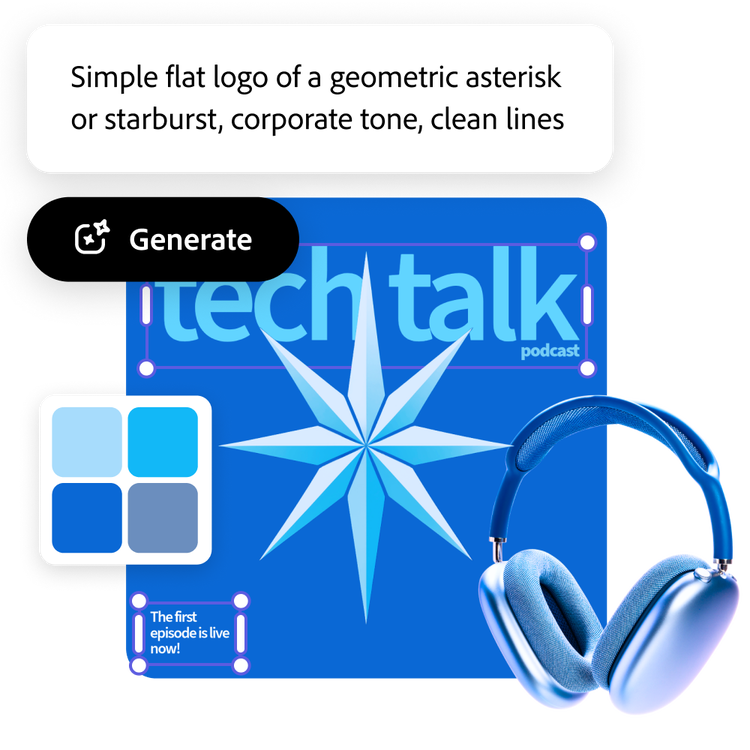
Easily generate an AI logo with Adobe Express. Simply describe what you want your logo to look like, choose from a range of styles, and explore tons of generated logo options using generative credits. Create and edit designs regardless of skill level.
geometric abstract logo mark combining hexagons and cubes, futuristic style with neon blue and purple
Use this prompt
Prompt used
eco-friendly logo for an organic food company, green leaves icon, natural style
Use this prompt
Prompt used
handwritten style wordmark logo with the name ‘Luna’, casual script font, soft pastel colors
Use this prompt
Prompt used
clean and bold monogram logo using the initials J and K, geometric style, blue and white color scheme
Use this prompt
How to generate a logo with AI.
1
Enter your text prompt.
Type a description of what you want to see in the prompt box. Start with 5 words or more, such as "modern logo for a tech startup." Add more descriptive words for better results.
2
Generate your logo.
Click Generate and watch as the results appear in a few seconds. If you're going for a specific style or composition, upload reference images and generate your logo again.
3
Refine, edit, re-generate.
Modify your newly generated logo further in the Adobe Express editor.
4
Download your logo.
Download your logo as a PNG file with a transparent background to save or share.
The world's leading businesses use Adobe Express.
Quickly and easily generate your AI logo.
Need a logo fast? Skip the blank page—the AI logo generator turns your idea into a ready-to-use, high-quality design in minutes. Just describe it, customize it, and download it. Create and edit designs regardless of skill level.
Generate an AI logo that fits your style.
Have a look you’re going for? Add a few style and composition references, and the AI logo generator will use it as inspiration. Whether you like clean geometry, organic shapes, or pops of color, you can guide our generative AI to create a logo that fits your brand vision.
Grow your brand with Adobe Express.
Whether you’re a small business, content creator, or just looking to stand out, Adobe Express makes it easy to generate an AI logo that captures your brand's look and feel. Customize your logo in the full editor with text, icons, and design elements to get the look just right. Once you're done, apply your logo across posters, flyers, merch, and more.
Easily generate your AI logo design with Adobe Express.
Frequently asked questions.
What is the benefit of using an AI logo generator?
The AI logo generator lets you create a professional-looking logo quickly and easily. Create and edit designs regardless of skill level. Simply type in a prompt and upload style or composition references to help our generative AI create a logo that fits your design vision.
Can I add text or graphics to my AI generated logo?
If you want to modify your AI-generated logo to feel authentically yours, you can customize it directly in the Adobe Express editor for free and upload your own text, graphics, and so much more.
Which colors should I use for my AI logo design?
Your logo is often the first thing people notice about your brand, so choosing the right colors matters. Start by thinking about your industry and the feeling you want to convey. For example, a plant nursery might lean into greens and earthy tones, while a more traditional business—like a law firm or corporation—may opt for bold, professional colors like navy or black.
Can I get Adobe Express for free? If so, what’s included?
Yes, Adobe Express has a free plan. Enjoy everything you need to stand out, including thousands of templates, photo editing and effects, and animation. See our pricing page for details and to compare plans.
Is Adobe Express beginner-friendly?
Absolutely. Adobe Express is easy-to-use and all skill levels are welcome.
You can control how Adobe websites use cookies and similar technologies by making choices below. But note that if you disable cookies and similar technologies entirely, Adobe websites may not function properly.
Cookies are small text files stored by your web browser when you use websites. There are also other technologies that can be used for similar purposes like HTML5 Local Storage and local shared objects, web beacons, and embedded scripts. These technologies help us do things like remembering you and your preferences when you return to our sites, measure how you use the website, conduct market research, and gather information about the ads you see and interact with.
You can make choices in the menu below about what cookies and other technologies you want us to use on Adobe sites when you visit them from this browser. You can always change those choices later by clicking on the Cookie Preferences link at the bottom of the page.
If enabled:
We can improve your experience by tailoring the site and the content to things we think might be of interest
We can better keep track of your preferences — like what language you prefer to use
We will better understand your likely interests so we can provide you more relevant Adobe ads and content on non-Adobe websites and in non-Adobe apps
It will help us improve the performance of our website and those of our partners who use the Adobe Experience Cloud
If disabled:
We won’t be able to remember you from session to session so the experience may not be tailored to your interests
You’ll still have access to the content of the site but certain features that depend on cookies may not function
You’ll still see ads, they just may not be as relevant to you
General information
You can control how Adobe websites use cookies and similar technologies by making choices below. But note that if you disable cookies and similar technologies entirely, Adobe websites may not function properly.
Cookies are small text files stored by your web browser when you use websites. There are also other technologies that can be used for similar purposes like HTML5 Local Storage, web beacons, and embedded scripts. These technologies help us do things like remembering you and your preferences when you return to our sites, measure how you use the website, conduct market research, and gather information about the ads you see and interact with.
You can make choices in the menu below about what cookies and other technologies you want us to use on Adobe sites when you visit them from this browser. You can always change those choices later by clicking on the Cookie Preferences link at the bottom of the page.
If enabled:
We can improve your experience by tailoring the site and the content to things we think might be of interest
We can better keep track of your preferences — like what language you prefer to use
We will better understand your likely interests so we can provide you more relevant Adobe ads and content on non-Adobe websites and in non-Adobe apps
It will help us improve the performance of our website and those of our partners who use the Adobe Experience Cloud
If disabled:
We won’t be able to remember you from session to session so the experience may not be tailored to your interests
We’ll still count your use of our site and services
You’ll still have access to the content of the site but certain features that depend on cookies may not function
You’ll still see ads, they just may not be as relevant to you
Operate the site and core servicesOperate site and measure engagement
Always active
These cookies are required, and they are used to enable the site and related services core functionality. Without them the site could not operate, so they cannot be disabled.
These cookies enable the site and related services’ core functionality and collect statistics about user engagement, such as counting active use to help us understand trends. These cookies cannot be disabled.
Measure performance
These cookies are used to analyze site usage to measure and improve performance. Without them Adobe cannot know what content is most valued and how often unique visitors return to the site, making it hard to improve information we offer to you.
These cookies are used to analyze site usage to measure and improve performance. Without them Adobe cannot know what content is most valued, making it hard to improve information we offer to you.
Extend functionality
These cookies are used to enhance the functionality of Adobe sites such as remembering your settings and preferences to deliver a personalized experience; for example, your username, your repeated visits, preferred language, your country, or any other saved preference.
Personalize advertising
These cookies are used to enable Adobe and our partners to serve ads more relevant to your interests. Without them you will still see ads, but they might not be as relevant to you.